

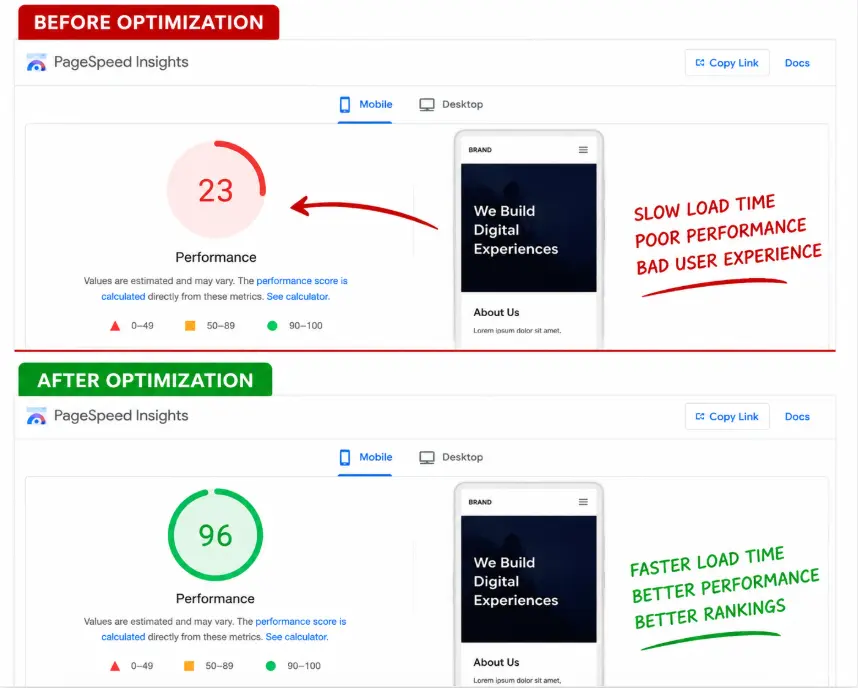
How to Fix Your Google PageSpeed Insights Score: A Complete Guide
Why Your PageSpeed Score Actually Matters
- Google uses page speed as a ranking factor, especially for mobile search
- Every extra second of load time increases bounce rate. Visitors leave before they even see your offer
- Slow sites convert worse. People don't fill out forms or buy from pages that feel sluggish
1. Reduce Overall Page Size
- Unoptimized images and videos
- Unused CSS and JavaScript being loaded on every page
- Bulky third-party scripts (chat widgets, analytics, ad pixels)
- Uncompressed text-based files (HTML, CSS, JS)
- Enable GZIP or Brotli compression on your server for HTML, CSS, and JS — this alone can cut text-based file sizes by 60–80%
- Minify CSS and JS to strip out whitespace, comments, and unnecessary characters
- Remove unused CSS/JS. Frameworks like Bootstrap are convenient, but if you're only using 30% of the component library, the rest is dead weight. Tools like PurgeCSS can strip unused styles automatically
- Audit third-party scripts. Every embedded widget is a request to someone else's server. Keep only what's essential
- Set a page weight budget. A good target for a marketing page is under 1–2MB total; ecommerce product pages can run a bit higher but should still be lean

2. Font Optimization
Fonts are one of the most overlooked speed killers. A page loading three weights of two different Google Fonts can add several render-blocking requests before a single word appears on screen.
How to fix it:
- Limit yourself to 1–2 font families and 2–3 weights. Every additional weight/style is a separate file download
- Use font-display: swap in your @font-face rules so text renders in a fallback font immediately, then swaps once the custom font loads — this prevents invisible text while fonts load
- Self-host fonts instead of loading from Google Fonts' CDN when possible. This removes an extra DNS lookup and connection, and gives you more caching control
- Preload critical fonts with for the fonts used above the fold
- Use modern formats (WOFF2) instead of older TTF/OTF — WOFF2 is significantly smaller

3. Image Optimization: Lazy vs. Eager Loading
Images are usually the single biggest contributor to page weight, and how you load them matters as much as how you compress them.
Compression and format:
- Convert images to WebP or AVIF instead of JPEG/PNG — typically 25–50% smaller at the same visual quality
- Resize images to their actual display size. Don't upload a 4000px-wide image into a 600px-wide container
- Use responsive images (srcset and sizes) so mobile devices download smaller versions automatically
Lazy loading vs. eager loading — use both, strategically:
This is where a lot of sites get it wrong. The rule is simple:
- Eager load (default behavior) for anything above the fold — especially your hero image or LCP (Largest Contentful Paint) element. If you lazy-load your hero image, you're actually delaying your most important content and hurting your score
- Lazy load everything below the fold using loading="lazy" on
tags. This defers offscreen images until the user scrolls near them, saving bandwidth and speeding up initial load


Getting this backwards — lazy-loading the hero, eager-loading everything else — is one of the most common mistakes I see on client sites.
4. Fix Render-Blocking Resources
"Render-blocking resources" means the browser has to stop and download/parse a CSS or JS file before it can paint anything on screen. This is one of the most common PageSpeed warnings.
How to fix it:
- Inline critical CSS. Extract the small amount of CSS needed to render above-the-fold content and put it directly in the , then load the rest of your stylesheet asynchronously
- Defer non-critical JavaScript using the defer attribute, so scripts download in the background without blocking HTML parsing:
- Move scripts to the bottom of the page (or use defer/async) rather than loading them in the
- Async-load third-party scripts (chat widgets, analytics) so they don't hold up your core content
- Avoid @import in CSS — it creates additional blocking requests. Use tags instead
5. Fix Layout Shifts (Cumulative Layout Shift / CLS)
Layout shift is what happens when elements jump around as the page loads — text moves down because an image above it just loaded, or a button shifts because an ad banner popped in. Google measures this as CLS, and it's a major factor in your overall score and Core Web Vitals.
How to fix it:
- Always set explicit width and height attributes on images and video (or use aspect-ratio in CSS). This reserves the space before the image loads, so nothing jumps
- Reserve space for ads and embeds using fixed-size containers, even before the content loads in
- Avoid inserting content above existing content dynamically (e.g., a banner that pushes everything down after the page has already rendered)
- Preload web fonts (see the font section above) — swapping from a fallback font to a custom font with very different character widths can cause noticeable reflow
- Be careful with dynamically injected content like cookie banners or promo bars — animate them in with transform instead of pushing layout with margin/height changes
Putting It All Together
Fixing your PageSpeed score isn't about chasing a number — it's about giving visitors a page that feels instant, which keeps them on your site longer and improves conversions. The five areas above (page size, fonts, images, render-blocking resources, and layout shifts) account for the vast majority of points lost in most PageSpeed audits.
If you've gone through this list and your site is still scoring low, or you'd rather not spend a weekend elbow-deep in DevTools, that's exactly what I do for clients — auditing the site, fixing the underlying issues, and re-testing until the numbers (and the real-world feel) actually improve.
.